
Technical data




Managing nPartitions
Creating a New nPartition
HP System Partitions Guide: Administration for nPartitions, rev 5.1
268
You can cancel the new nPartition creation at any time by clicking the
Cancel button.
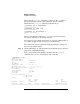
The following window shows the first step and overview for Partition
Manager’s create Partition —> Create Partition action.
If you specify for Partition Manager to automatically boot the new
nPartition, you can access the new nPartition’s BCH interface from its
console when you finish using the create partition task wizard.
Otherwise, if you do not specify to automatically boot the new nPartition,
you must use the service processor Command menu’s BO command to
boot the nPartition past boot-is-blocked (inactive, ready for reconfig
state) and make its BCH interface available.