
Technical data



Listing and Managing Server Hardware
Turning Attention Indicators (LEDs) On and Off
HP System Partitions Guide: Administration for nPartitions, rev 5.1
326
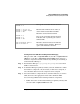
Table 7-1 lists the meanings for the various attention indicator states.
When all of a system’s components are functioning and no service
operations are occurring, every attention indicator should be turned off.
(HP Superdome cabinet number LCDs remain lit or blinking when
cabinet power is on.)
LEDs for Hardware Components
You can control (turn off, blink, and/or turn on) attention indicators for
the following hardware components.
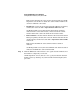
• Cell LEDs
Each cell or cell slot has its own attention indicators.
— On HP Superdome servers, each cell’s attention indicator is
located on the server cabinet hardware below the cell’s slot, just
to the right of the cell slot’s power LED.
—OnHPrp7410 and rp8400 servers, each cell’s attention indicator
is located on the cell hardware, to the outside of the cell’s power
LEDs.
• I/O Chassis LEDs
On HP Superdome servers only, each I/O chassis has a attention
indicator, which is located on the cabinet above the I/O chassis.
• PCI Card Slot LEDs
On all HP nPartition systems, each PCI card slot has an attention
indicator that you can use to select the card slot. You can view a PCI
card slot’s attention indicator when accessing the card cage.
Table 7-1 Attention Indicator (LED) States and Meanings
Attention
Indicator State
Meaning
OFF Not selected.
BLINKING Selected to be used in a service operation.
ON Supported for PCI card slot LEDs only.
Service required, problems have been identified with the component.