
Technical data




Listing and Managing Server Hardware
Listing Cell Processor and Memory Configurations
HP System Partitions Guide: Administration for nPartitions, rev 5.1
333
Listing Cell Processors and Memory [Service Processor]
This procedure (Command menu, PS command) lists cell processor and
memory configurations using the service processor Command menu.
Step 1. Login to the system’s service processor and enter CM to access the
Command menu.
You can check processor and memory details for any cell in the complex
from the service processor.
Step 2. Issue the PS command and specify the cell whose processor and memory
details you want to view.
The PS command reports details for the cell including its processor
configuration (CPU population) and its memory configuration (DIMM
population).
For the cell memory configuration details, the PS command displays each
populated DIMM and identifies it using its rank notation (0A–0D,
1A–1D, and so on).
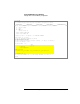
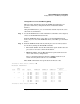
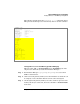
The following example shows details for cell 0 in cabinet 0, which has
four processors (0–3) and four DIMMs installed (0A–0D).