
Technical data




Listing and Managing Server Hardware
Deconfiguring Cells, Processors, and Memory
HP System Partitions Guide: Administration for nPartitions, rev 5.1
341
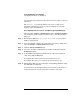
When you deallocate a DIMM, all other DIMMs in the rank also will
not be used the next time the nPartition boots.
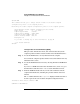
DIMMDEALLOC
cell dimm
OFF deconfigures the specified DIMM (
dimm
)
on the cell (
cell
) indicated.
DIMMDEALLOC
cell dimm
ON configures the specified DIMM on the cell.
For example, DIMMDEALLOC 0 1B OFF sets DIMM 1B on cell 0 to be
deallocated the next time the nPartition boots, and as a result all
other DIMMs in the same rank (1A, 1C, and 1D) also will not be
used.
Enter HELP DIMMDEALLOC for details.
Step 4. Reboot the nPartition using the REBOOT command.
Whenever changing cell, processor, or memory configurations you must
reboot the corresponding nPartition to allow the configuration changes to
take place.
Deconfiguring Cells, Processors, and Memory [HP-UX]
This procedure (parmodify -p
#
-m
#
::[y|n]:) configures or
deconfigures (makes inactive) cells from the HP-UX command line.
Step 1. Login to HP-UX on the nPartition whose cell you want to configure or
deconfigure.
Step 2. Issue the parstatus -C command to list all cells, their nPartition
assignments, their actual (current) usage, and their use-on-next-boot
values.
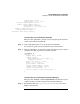
Step 3. Issue the parmodify -p
#
-m
#
::[y|n]: command to configure or
deconfigure the specified cell (-m
#
) from the nPartition (-p
#
).
The parmodify -p
#
-m
#
::n: command deconfigures the specified cell
(-m
#
). This sets the cell’s use-on-next-boot value to “n” (do not use).
The parmodify -p
#
-m
#
::y: command configures the specified cell to
be used. This sets the cell’s use-on-next-boot value to “y” (use the cell).
The partition number (-p
#
) you specify must be the local nPartition
number, which you can list using the parstatus -w command.
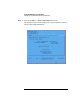
Step 4. Reboot the nPartition using the shutdown -R command.