
Technical data




Listing and Managing Server Hardware
Deconfiguring Cells, Processors, and Memory
HP System Partitions Guide: Administration for nPartitions, rev 5.1
342
You must reboot the partition to allow the new use-on-next-boot values to
take effect.
The shutdown -R command performs a reboot for reconfig for the
nPartition, which allows all cells to reboot, including any currently
inactive cells in the nPartition.
Deconfiguring Cells, Processors, and Memory [Partition Manager]
This procedure (Partition —> Modify Partition menu, Change Cell Attributes
tab) configures and deconfigures (makes inactive) cells using Partition
Manager.
Step 1. Run Partition Manager (/opt/parmgr/bin/parmgr) or access it from
SAM or a Web browser.
Step 2. Select the nPartition whose cell configuration you want to modify, then
select the Partition —> Modify Partition menu item.
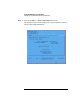
Step 3. Click the Change Cell Attributes tab.
Step 4. Select the cell whose configuration you want to modify, then click the
Modify Cell(s) button.
Step 5. In the Modify Cell Attributes window, set the cell’s use-on-next-boot
value, then click the OK button.
To configure the cell to be used set use-on-next-boot to “yes”.
To configure the cell to not be used set use-on-next-boot to “no”.
Step 6. Exit Partition Manager, then reboot the corresponding nPartition using
the shutdown -R command.
You must reboot the nPartition whose use-on-next-boot cell values you
changed to allow the new use-on-next-boot values to take effect.