
Technical data




Listing and Managing Server Hardware
Listing the Server Product Number and Serial Number
HP System Partitions Guide: Administration for nPartitions, rev 5.1
344
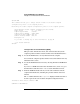
GSP:CM> ID
This command allows you to change certain fields in the Stable complex
configuration portion of the complex profile.
Retrieving the stable complex configuration portion of the complex profile.
GSP modifiable stable complex configuration data fields.
Model String : 9000/800/SD64000
Complex System Name : feshd5
Complex Serial Number : USR2024FP1
Original Product Number: A5201A
Current Product Number : A5201A
Enterprise Id :
Do you want to modify any of this information? (Y/[N]) n
-> No fields modified.
GSP:CM>
Listing Product and Serial Numbers [BCH]
This procedure (Information menu, CID command) lists the system
complex’s product number and serial number from the BCH interface.
Step 1. Access the BCH interface for any nPartition in the complex.
You can list the complex’s product number and serial number from any
nPartition in the server.
Step 2. Access the BCH Information menu by entering IN from the BCH Main
menu.
If you are at a BCH menu other than the Main menu, enter MA to go to
the Main menu and then enter IN to access the Information menu.
Step 3. From the BCH Information menu, use the CID command to list the
complex’s ID information, including the product number and serial
number.
The CID BCH command (also: ComplexID) displays information that is
stored as part of the server’s Stable Complex Configuration Data.
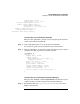
Information Menu: Enter command > CID
COMPLEX ID INFORMATION