
Technical data




Listing and Managing Server Hardware
Listing the Server Product Number and Serial Number
HP System Partitions Guide: Administration for nPartitions, rev 5.1
345
Complex Name: feshd4
Model String: 9000/800/SD16000
Original Product Number: A5201A
Current Product Number: A5201A
Serial Number: USR2025FP2
Enterprise ID: 0x2020202020202020
Number of Supported Cells: 32
Complex Revision Number: 1.0
Information Menu: Enter command >
Listing Product and Serial Numbers [HP-UX]
This procedure (parstatus -X) lists a system complex’s product number
and its serial number from HP-UX.
Step 1. Login to HP-UX running on any of the system’s nPartitions.
You can list the product and serial numbers from any nPartition.
Step 2. Issue the parstatus -X command and option to display system complex
attributes, including the product and serial numbers.
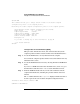
# parstatus -X
[Complex]
Complex Name : feshd5
Complex Capacity
Compute Cabinet (8 cell capable) : 2
IO Expansion Cabinet : 1
Active GSP Location : cabinet 0
Model : 9000/800/SD64000
Serial Number : USR2024FP1
Current Product Number : A5201A
Original Product Number : A5201A
Complex Profile Revision : 1.0
The total number of Partitions Present : 2
#
Listing Product and Serial Numbers [Partition Manager]
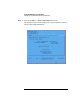
This procedure (Complex —> Show Complex Details menu) lists the system
complex’s product and serial numbers using Partition Manager.
Step 1. Run Partition Manager (/opt/parmgr/bin/parmgr) or access it from
SAM or a Web browser.