
Technical data




Listing and Managing Server Hardware
Checking Blower and Fan Status
HP System Partitions Guide: Administration for nPartitions, rev 5.1
347
Checking Blower and Fan Status
You can remotely check the operating status of a server complex’s
blowers and fans by using software commands and utilities.
NOTE Different HP server and cabinet models have different blower and fan
configurations.
You can use the following procedures:
• Checking Fan Status [Service Processor] on page 347
This procedure (PS command, “Cabinet” option) checks fan and
blower status from the service processor Command menu.
• Checking Fan Status [HP-UX] on page 348
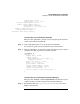
This procedure (parstatus -B or parstatus -V -b#) lists the status of
blowers and fans from HP-UX.
• Checking Fan Status [Partition Manager] on page 349
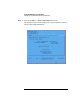
This procedure (Complex —> Show Complex Details menu,
Power/Cooling tab) lists fan status from Partition Manager.
Checking Fan Status [Service Processor]
This procedure (PS command, “Cabinet” option) checks fan and blower
status from the service processor Command menu.
Step 1. Login to the complex’s service processor and enter CM to access the
Command menu.
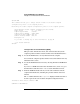
Step 2. Issue the PS command, select the “Cabinet” option, and specify the
cabinet number whose fan status you want to check.