
Technical data




Listing and Managing Server Hardware
Checking Blower and Fan Status
HP System Partitions Guide: Administration for nPartitions, rev 5.1
348
Checking Fan Status [HP-UX]
This procedure (parstatus -B or parstatus -V -b
#
) lists the status of
blowers and fans from HP-UX.
Step 1. Login to HP-UX running on any of the system’s nPartitions.
You can check blower and fan details from HP-UX running on any
nPartition.
Step 2. Issue the parstatus -B or parstatus -V -b# command.
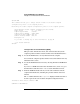
The parstatus -B command gives a brief summary of all cabinets
including fan status. The parstatus -V -b
#
command gives detailed
fan status for cabinet (-b
#
) that you specify.
# parstatus -B
[Cabinet]
Cabinet I/O Bulk Power Backplane
Blowers Fans Supplies Power Boards
OK/ OK/ OK/ OK/
Cab Failed/ Failed/ Failed/ Failed/
Num Cabinet Type N Status N Status N Status N Status GSP
=== ============ ========= ========= ========== ============ ======
0 SD64000 4/ 0/ N 4/ 1/ ? 6/ 0/ N+ 3/ 0/ N+ active
1 SD64000 4/ 0/ N+ 5/ 0/ ? 6/ 0/ N+ 3/ 0/ N+ none
8 IOX 2/ 0/ N+ 4/ 0/ N+ 2/ 0/ N+ N/A none
4/ 0/ N+
Notes: N+ = There are one or more spare items (fans/power supplies).
N = The number of items meets but does not exceed the need.
N- = There are insufficient items to meet the need.
? = The adequacy of the cooling system/power supplies is unknown.
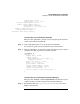
# parstatus -V -b0
[Cabinet]
Cabinet I/O Bulk Power Backplane
Blowers Fans Supplies Power Boards
OK/ OK/ OK/ OK/
Cab Failed/ Failed/ Failed/ Failed/
Num Cabinet Type N Status N Status N Status N Status GSP
=== ============ ========= ========= ========== ============ ======
0 SD64000 4/ 0/ N 4/ 1/ ? 6/ 0/ N+ 3/ 0/ N+ active
Cabinet Blowers
===============
Fan 0 ok
Fan 1 ok
Fan 2 ok