
Technical data




Listing and Managing Server Hardware
Checking Blower and Fan Status
HP System Partitions Guide: Administration for nPartitions, rev 5.1
349
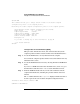
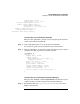
Fan 3 ok
I/O Fans
==============
Fan 0 ok
Fan 1 failed
Fan 2 ok
Fan 3 ok
Fan 4 ok
Bulk Power Supplies(BPS)
========================
Power Supply 0 ok
....
Checking Fan Status [Partition Manager]
This procedure (Complex —> Show Complex Details menu, Power/Cooling
tab) lists fan status from Partition Manager.
Step 1. Run Partition Manager (/opt/parmgr/bin/parmgr) or access it from
SAM or a Web browser.
Step 2. Select the Complex —> Show Complex Details menu item.
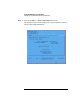
This displays the Complex Details window.
Step 3. Click the Power/Cooling tab to view the panel that has information about
the status of the blowers and fans in the complex.