
Technical data




Listing and Managing Server Hardware
Complex Health Analysis of a Server
HP System Partitions Guide: Administration for nPartitions, rev 5.1
350
Complex Health Analysis of a Server
You can quickly check for hardware problems in an nPartition server by
using Partition Manager’s “Analyze Complex Health” feature.
This feature scans the server complex and uses problem detectors to
check the operating status of cells, I/O chassis, fans and blowers, and
power supplies.
Partition Manager automatically performs this task when you launch
the application; if any problems are detected then the complex health
analysis is displayed before Partition Manager’s primary window.
Analyzing Server Complex Health [Partition Manager]
This procedure (Complex —> Analyze Complex Health action) quickly
checks a server complex’s operating status from Partition Manager.
Step 1. Run Partition Manager (/opt/parmgr/bin/parmgr) or access it from
SAM or a Web browser.
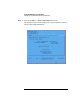
Step 2. Select the Complex —> Analyze Complex Health action.
Partition Manager displays a window that reports the hardware analysis
results. To re-analyze the server’s health click the Refresh button.