
Technical data





Listing and Managing Server Hardware
Listing the Cabinets in a Server Complex
HP System Partitions Guide: Administration for nPartitions, rev 5.1
352
Listing the Cabinets in a Server Complex
You can list all cabinets in a server complex by using software commands
and utilities, which allow you to determine the complex’s cabinet
configuration from a remote location.
You can use the following procedures:
• Listing Cabinets [Service Processor] on page 352
This procedure (Command menu, DU command) lists all cabinets in
the server complex using the service processor.
• Listing Cabinets [HP-UX] on page 353
This procedure (parstatus -B or parstatus -V -b#) lists cabinet details
from HP-UX.
• Listing Cabinets [Partition Manager] on page 353
This procedure (Complex —> Show Complex Details menu, Cabinet
Info panel) lists the cabinets in a server complex from Partition
Manager.
Listing Cabinets [Service Processor]
This procedure (Command menu, DU command) lists all cabinets in the
server complex using the service processor.
Step 1. Login to the server’s service processor and enter CM to access the
Command menu.
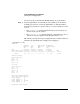
Step 2. Issue the DU command to list all cabinets in the server complex.
GSP:CM> DU
The following GSP bus devices were found:
+----+-----+-----------+----------------+-----------------------------------+
| | | | | Core IOs |
| | | | | IO Bay | IO Bay | IO Bay | IO Bay |
| | | UGUY | Cells | 0 | 1 | 2 | 3 |
|Cab.| | | |IO Chas.|IO Chas.|IO Chas.|IO Chas.|
| # | GSP | CLU | PM |0 1 2 3 4 5 6 7 |0 1 2 3 |0 1 2 3 |0 1 2 3 |0 1 2 3 |
+----+-----+-----+-----+----------------+--------+--------+--------+--------+
| 0 | * | * | * |* * * * | * | * | | |
| 1 | | * | * |* * * | | * | | |