
Technical data





Listing and Managing Server Hardware
Listing the nPartitions in a Server
HP System Partitions Guide: Administration for nPartitions, rev 5.1
354
Listing the nPartitions in a Server
You can list details about the nPartitions defined in a server complex,
including the partition numbers, nPartition names, and the cells
assigned to the nPartitions.
You can use the following procedures:
• Listing nPartitions [Service Processor] on page 354
This procedure (Command menu, CP command) lists all nPartitions
using the service processor.
• Listing nPartitions [HP-UX] on page 355
This procedure (parstatus -P) lists a server’s nPartitions from HP-UX.
• Listing nPartitions [Partition Manager] on page 355
This procedure (viewing the left side of the primary window) displays
all nPartitions in the server using Partition Manager.
Listing nPartitions [Service Processor]
This procedure (Command menu, CP command) lists all nPartitions
using the service processor.
Step 1. Login to the server’s service processor and enter CM to access the
Command menu.
Step 2. Issue the service processor Command menu’s CP command to list all
nPartitions defined in the server complex.
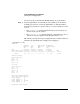
The CP command lists the partition number (Part 0, Part 1, and so on) for
each nPartition and lists which cells are assigned to each nPartition.
GSP:CM> CP
--------------
Cabinet | 0 |
--------+----+
Slot |0123|
--------+----+
Part 0 |*...|