
Technical data





Listing and Managing Server Hardware
Listing the nPartitions in a Server
HP System Partitions Guide: Administration for nPartitions, rev 5.1
355
Part 1 |.*..|
GSP:CM>
Listing nPartitions [HP-UX]
This procedure (parstatus -P) lists a server’s nPartitions from HP-UX.
Step 1. Login to HP-UX running on any of the server’s nPartitions.
You can list all nPartitions from any nPartition in the server.
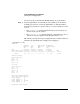
Step 2. Issue the parstatus -P command and option to list all nPartitions and
their current status.
# parstatus -P
[Partition]
Par # of # of I/O
Num Status Cells Chassis Core cell Partition Name (first 30 chars)
=== ============ ===== ======== ========== ===============================
0 active 2 2 cab0,cell0 jules00
1 active 2 2 cab0,cell4 jules01
#
Listing nPartitions [Partition Manager]
This procedure (viewing the left side of the primary window) displays all
nPartitions in the server using Partition Manager.
Step 1. Run Partition Manager (/opt/parmgr/bin/parmgr) or access it from
SAM or a Web browser.
Step 2. Access Partition Manager’s primary window, and view the list of
nPartitions shown on the window’s left side.
Each nPartition is listed separately. Also listed here are the server’s
Available Resources, which are not assigned to any nPartition.