
Technical data





Listing and Managing Server Hardware
Checking for Power Supply Failures
HP System Partitions Guide: Administration for nPartitions, rev 5.1
360
You can check power details from HP-UX running on any nPartition.
Step 2. Issue the parstatus -B command for a brief summary of all cabinets
including power status, or issue the parstatus -V -b
#
command for
detailed power status for a specific cabinet (-b
#
) whose details you want
to view.
• The parstatus -B command summarizes the power status for all
cabinets in the system complex.
• The parstatus -V -b
#
command displays a detailed status (“ok” or
“failed”) for all power supplies in the specified cabinet (-b
#
).
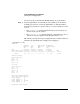
The following example shows power supply details for cabinet number 0,
which has one failed bulk power supply (Power Supply 3).
# parstatus -V -b0
[Cabinet]
Cabinet I/O Bulk Power Backplane
Blowers Fans Supplies Power Boards
OK/ OK/ OK/ OK/
Cab Failed/ Failed/ Failed/ Failed/
Num Cabinet Type N Status N Status N Status N Status GSP
=== ============ ========= ========= ========== ============ ======
0 SD32000 4/ 0/ N+ 5/ 0/ ? 3/ 1/ N 3/ 0/ N+ active
Cabinet Blowers
===============
Fan 0 ok
Fan 1 ok
Fan 2 ok
Fan 3 ok
I/O Fans
==============
Fan 0 ok
Fan 1 ok
Fan 2 ok
Fan 3 ok
Fan 4 ok
Bulk Power Supplies(BPS)
========================
Power Supply 0 ok
Power Supply 1 ok
Power Supply 3 failed
Power Supply 4 ok
Backplane Power Boards