
Technical data






Processor Sets (Psets) on nPartitions
Example Uses of Psets
HP System Partitions Guide: Administration for nPartitions, rev 5.1
434
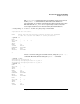
NONEMPTY DFLTPSET
EMPTY FAIL
LASTSPU DFLTPSET
#
Example 10-2 Destroying a Pset and Reassigning Processors
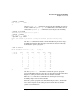
List the local nPartition’s Pset configuration using the psrset -i
command. There are three Psets: the default Pset 0, Pset 10, and Pset
11.
# psrset -i
PSET 0
SPU_LIST 0 1 2 3 4
OWNID 0
GRPID 0
PERM 755
IOINTR ALLOW
NONEMPTY DFLTPSET
EMPTY FAIL
LASTSPU DFLTPSET
PSET 10
SPU_LIST 9 10 11
OWNID 0
GRPID 3
PERM 755
IOINTR ALLOW
NONEMPTY DFLTPSET
EMPTY FAIL
LASTSPU DFLTPSET
PSET 11
SPU_LIST 5 6 7 8
OWNID 0
GRPID 3
PERM 755
IOINTR ALLOW
NONEMPTY DFLTPSET
EMPTY FAIL
LASTSPU DFLTPSET
#
Destroy Pset 10 because it is no longer needed. Its processors (9, 10, and
11) are assigned back to the default processor set (Pset 0). Then list the
new Pset configurations using the psrset -i command.