
Technical data






Processor Sets (Psets) on nPartitions
Example Uses of Psets
HP System Partitions Guide: Administration for nPartitions, rev 5.1
435
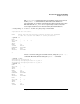
# psrset -d 10
successfully destroyed pset 10
# psrset -i
PSET 0
SPU_LIST 0 1 2 3 4 9 10 11
OWNID 0
GRPID 0
PERM 755
IOINTR ALLOW
NONEMPTY DFLTPSET
EMPTY FAIL
LASTSPU DFLTPSET
PSET 11
SPU_LIST 5 6 7 8
OWNID 0
GRPID 3
PERM 755
IOINTR ALLOW
NONEMPTY DFLTPSET
EMPTY FAIL
LASTSPU DFLTPSET
#
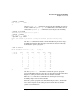
Assign processors 4 and 9 to Pset 11 using the psrset -a... command.
Then list the new Pset configurations using psrset -i, which shows the
processor assignments for all Psets (Pset 0 and Pset 11).
# psrset -a 11 4 9
successfully assigned processor 4 to pset 11
successfully assigned processor 9 to pset 11
# psrset -i
PSET 0
SPU_LIST 0 1 2 3 10 11
OWNID 0
GRPID 0
PERM 755
IOINTR ALLOW
NONEMPTY DFLTPSET
EMPTY FAIL
LASTSPU DFLTPSET
PSET 11
SPU_LIST 4 5 6 7 8 9
OWNID 0
GRPID 3
PERM 755
IOINTR ALLOW
NONEMPTY DFLTPSET
EMPTY FAIL