
Technical data






Processor Sets (Psets) on nPartitions
Example Uses of Psets
HP System Partitions Guide: Administration for nPartitions, rev 5.1
436
LASTSPU DFLTPSET
#
Example 10-3 Example of Running and Binding Programs in Psets
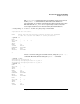
List the current Pset configuration for the local nPartition. Two Psets are
configured: Pset 0 and Pset 2.
Note that processor ID 10 is not active in this nPartition (because iCOD
software has deactivated it).
# psrset -i
PSET 0
SPU_LIST 0 2 9
OWNID 0
GRPID 0
PERM 755
IOINTR ALLOW
NONEMPTY DFLTPSET
EMPTY FAIL
LASTSPU DFLTPSET
PSET 2
SPU_LIST 1 3 4 5 6 7 8 11
OWNID 0
GRPID 3
PERM 755
IOINTR ALLOW
NONEMPTY DFLTPSET
EMPTY FAIL
LASTSPU DFLTPSET
#
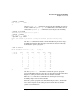
Use the mpsched command to run the “potato” program and bind it to
processor ID 2. Then use the psrset -q... command to list the Pset
binding for “potato” (process ID 10368); “potato” is bound to Pset 0.
# mpsched -c 2 ./potato -n 7
Pid 10368: bound to processor 2 using the default process launch policy
Threads = 7
tid = 2 cpu = 2
tid = 3 cpu = 2
tid = 4 cpu = 2
tid = 5 cpu = 2
tid = 6 cpu = 2
tid = 7 cpu = 2
tid = 1 cpu = 2