
Technical data






Processor Sets (Psets) on nPartitions
Example Uses of Psets
HP System Partitions Guide: Administration for nPartitions, rev 5.1
437
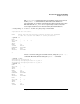
# psrset -q 10368
PID 10368 PSET 0
#
Use the psrset -b... command to change the Pset binding for “potato”
to Pset 2. Then use psrset -q... to confirm that it is bound to Pset 2,
and use the mpsched -q... command to check its processor binding.
# psrset -b 2 10368
successfully bound pid 10368 to pset 2
# psrset -q 10368
PID 10368 PSET 2
# mpsched -q -p 10368
Pid 10368: bound to processor 3 using the default process launch policy
#
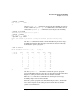
Use the sar command to list the current nPartition’s processor usage,
including Pset details. Note that processor ID 3 in (Pset 2) is heavily
loaded by the “potato” program.
# sar -u -M -P 1
HP-UX feshd5a B.11.11 U 9000/800 10/23/01
00:17:11 pset cpu %usr %sys %wio %idle
00:17:12 0 0 0 0 7 92
2 1 0 0 10 90
0 2 0 0 8 92
2 3 100 0 0 0
2 4 0 0 4 96
2 5 0 0 8 92
2 6 0 0 7 93
2 7 0 0 9 91
2 8 0 0 5 95
0 9 0 1 9 90
2 11 0 0 8 92
system 9 0 7 84
#
Use the mpsched -u... command to unbind the “potato” program
(process ID 10368) from processor ID 3, to allow the program’s threads to
migrate to other processors in the Pset to which it is bound.
Then use sar to list the local nPartition’s current processor usage,
including all processor and Pset details.
Since the “potato” program was unbound from processor 3, its threads
were able to migrate to the other processors in the Pset to which it
“potato” is bound (Pset 2).