
Technical data






Processor Sets (Psets) on nPartitions
Example Uses of Psets
HP System Partitions Guide: Administration for nPartitions, rev 5.1
439
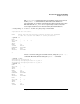
PSET 7
SPU_LIST 9 10 11
OWNID 0
GRPID 3
PERM 755
IOINTR ALLOW
NONEMPTY DFLTPSET
EMPTY FAIL
LASTSPU DFLTPSET
PSET 8
SPU_LIST 6 7 8
OWNID 0
GRPID 3
PERM 755
IOINTR ALLOW
NONEMPTY DFLTPSET
EMPTY FAIL
LASTSPU DFLTPSET
#
Modify the group setting for Pset 8 to be group ID 20. Also use
psrset -t... to modify the permissions for Pset 8. Setting the
permissions to 774 allows the owner (root) and users in group ID 20 (the
group named users) to execute, write, and read Pset 8; all others can
only read details about the Pset’s configuration.
# psrset -t 8 GRPID=20
# psrset -t 8 PERM=774
#
Using the psrset -t... command, change the owner for Pset 7 to user
ID 103 (the user named ann).
# psrset -t 7 OWNID=103
#
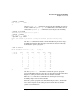
Now ann uses the id command to list the user ID and group
memberships for her user account. She then lists the current Pset
configuration for the local nPartition.
The ann user account gives her execute and read access to Pset 0,
ownership of Pset 7 (including execute, write, and read access), and
execute, write, and read access for Pset 8.
She (ann) is considered one of the “others” (access permissions 5) for
Pset 0, the owner (user ID 103, with access permissions 7) for Pset 7, and
a group member (group ID 20, access permission 7) for Pset 8.