
Technical data






Processor Sets (Psets) on nPartitions
Example Uses of Psets
HP System Partitions Guide: Administration for nPartitions, rev 5.1
440
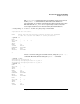
ann $ id
uid=103(ann) gid=20(users) groups=102(prog)
ann $ psrset -i
PSET 0
SPU_LIST 0 1 2 3 4 5
OWNID 0
GRPID 0
PERM 755
IOINTR ALLOW
NONEMPTY DFLTPSET
EMPTY FAIL
LASTSPU DFLTPSET
PSET 7
SPU_LIST 9 10 11
OWNID 103
GRPID 3
PERM 755
IOINTR ALLOW
NONEMPTY DFLTPSET
EMPTY FAIL
LASTSPU DFLTPSET
PSET 8
SPU_LIST 6 7 8
OWNID 0
GRPID 20
PERM 774
IOINTR ALLOW
NONEMPTY DFLTPSET
EMPTY FAIL
LASTSPU DFLTPSET
ann $
Because ann is the owner for Pset 7, she has authority to modify the
Pset’s user, group, and access permissions attributes.
Using the psrset -t... command, ann sets the group for Pset 7 to 102
(the group named prog). Another psrset -t... command sets access
permissions for Pset 7 to 770, which gives the owner (ann) and prog
group members access to execute, write, and read the Pset. All others
have no permissions to use or read Pset 7.
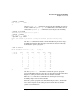
ann $ psrset -t 7 GRPID=102
ann $ psrset -t 7 PERM=770
ann $
Now ann assigns processor ID 8 to Pset 7, using the psrset -a...
command.