
Technical data






Processor Sets (Psets) on nPartitions
Example Uses of Psets
HP System Partitions Guide: Administration for nPartitions, rev 5.1
441
Processor 8 was assigned to Pset 8, but ann can reassign it because she
has write permission for Pset 8 (she is a member of group ID 20, which
has execute, write, and read permissions).
Likewise, ann can assign the processor to Pset 7 because she has write
permissions there (she is the owner, and has execute, write, and read
permissions).
Then ann lists the new configurations for Pset 7 and Pset 8 using the
psrset -i 7 8 command.
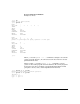
ann $ psrset -a 7 8
successfully assigned processor 8 to pset 7
ann $ psrset -i 7 8
PSET 7
SPU_LIST 8 9 10 11
OWNID 103
GRPID 102
PERM 770
IOINTR ALLOW
NONEMPTY DFLTPSET
EMPTY FAIL
LASTSPU DFLTPSET
PSET 8
SPU_LIST 6 7
OWNID 0
GRPID 20
PERM 774
IOINTR ALLOW
NONEMPTY DFLTPSET
EMPTY FAIL
LASTSPU DFLTPSET
ann $
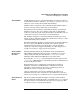
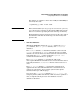
Now a different user in the same nPartition attempts to list and use the
new Pset configurations.
This user, joe, lists his user ID and the IDs for the groups to which he
belongs, and then lists all Pset configurations using the psrset -i
command. Note that because joe does not have read permission for
Pset 7, he cannot view its attribute values (he is not the owner or a
member of the Pset’s group, so as one of the “others” he has no
permissions).