
Technical data






Processor Sets (Psets) on nPartitions
Example Uses of Psets
HP System Partitions Guide: Administration for nPartitions, rev 5.1
442
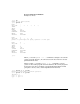
joe $ id
uid=102(joe) gid=20(users)
joe $ psrset -i
PSET 0
SPU_LIST 0 1 2 3 4 5
OWNID 0
GRPID 0
PERM 755
IOINTR ALLOW
NONEMPTY DFLTPSET
EMPTY FAIL
LASTSPU DFLTPSET
PSET 7
SPU_LIST 8 9 10 11
psrset: no privileges for query operation on this pset
PSET 8
SPU_LIST 6 7
OWNID 0
GRPID 20
PERM 774
IOINTR ALLOW
NONEMPTY DFLTPSET
EMPTY FAIL
LASTSPU DFLTPSET
joe $
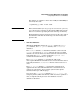
When joe uses the psrset -e 7... command to attempt to execute the
“potato” program in Pset 7, he cannot because he does not have execute
permission in the Pset.
However, when joe uses the psrset -e 8... command to execute
“potato” in Pset 8 the program is run in that Pset. He can run programs
in Pset 8 because he is a member of group ID 20 and members of that
group have execute, write, and read permission for the Pset.
joe $ psrset -e 7 ./potato
psrset: no privileges to perform operation
joe $ psrset -e 8 ./potato
Threads = 2
tid = 1 cpu = 6
tid = 2 cpu = 7
...