
Technical data






Virtual Partitions (vPars) Management on nPartitions
Configuring vPar Resources and Attributes
HP System Partitions Guide: Administration for nPartitions, rev 5.1
449
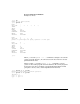
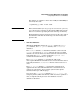
For example, to configure a vPar to have 2 GBytes (2048 MBytes)
of memory allocated:
# vparmodify -p
name
-m mem::2048
NOTE HP recommends that you only specify the total amount of memory
to be allocated for each vPar. On all supported HP vPar systems
there is no benefit to specifying the base and range for memory.
Each nPartition’s memory is interleaved across all active cells in
the nPartition and thus all useful ranges of vPar memory will
span all cells.
• vPar Boot Attributes
vPar boot attributes include the
autoboot
setting, the
kernel
path
attribute, the
boot options
attribute, and
io resources
attributes.
The
autoboot
attribute (-B) determines whether a vPar is booted
(-B auto) or not booted (-B manual) when the vPar is reset. This
attribute also affects vPar boot behavior when the vPars monitor is
loaded with the vpmon -a option or when the vparload -auto
command is issued from the MON> prompt.
The
kernel path
attribute (-b) specifies the path of the
vPar-capable HP-UX 11i kernel that is to be booted when the vPar is
loaded. By default the /stand/vmunix kernel on the boot device is
used.
The
boot options
attribute (-o) specifies the options that are
applied when the vPar’s HP-UX 11i kernel is booted. These boot
options are equivalent to the secondary system loader options
described in the hpux (1M) manpage.
You can use the
io resources
attributes (-a io..., -m io...) to
designate primary (PRI) and alternate (ALT) boot device paths for a
vPar, as explained in the previous “vPar hardware resource
attributes” discussion.