
Technical data






Virtual Partitions (vPars) Management on nPartitions
Tools for Managing vPars on nPartition Servers
HP System Partitions Guide: Administration for nPartitions, rev 5.1
451
NOTE The Virtual Partition Manager utility is not installed as part of the
Virtual Partitions software product installation. Instead, you must
install Virtual Partition Manager separately, as described in the the
book Installing and Managing HP-UX Virtual Partitions (vPars).
Using the Virtual Partition Manager utility requires root
permission.
Because Virtual Partition Manager is an X window graphical utility,
you must set and export the vPar system’s DISPLAY environment
variable before launching vparmgr. The DISPLAY variable specifies
where (which X server) the system displays X windows. You also
must use the xhost command on the X server (your local system) to
grant access for the vPar system to display windows on the X server.
See the X (1) and xhost (1) manpages for details.
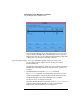
The following window is the Virtual Partition Manager utility’s
status window, which is the first window displayed after any alert
messages. This window lists the status of all vPars defined in the
current vPars database as well as general details about available
resources.