
Technical data






Virtual Partitions (vPars) Management on nPartitions
Creating a New vPar
HP System Partitions Guide: Administration for nPartitions, rev 5.1
476
6.10
6.11
6.12
6.13
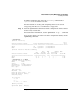
[Available CPUs]: 12
[Available I/O devices (path)]: 0.0.1
0.0.3
0.0.8
0.0.9
0.0.10
0.0.11
0.0.12
0.0.14
2.0
2.0.0
2.0.1
2.0.2
2.0.3
2.0.4
2.0.6
2.0.8
2.0.9
2.0.10
2.0.11
2.0.12
2.0.14
[Unbound memory (Base /Range)]: 0x0/64
(bytes) (MB) 0x8000000/6080
[Available memory (MB)]: 6144
#
Step 3. Issue the vparcreate -p... command to create the new vPar and as
needed use vparmodify -p... to further configure the new vPar.
When using the vparcreate command you must specify the name for the
new vPar (-p
vpname
).
You also should specify the resources that are to be assigned for exclusive
use by the vPar, including processor (-a cpu...) memory (-a mem...)
and input/output (-a io...) resources.
You also can include other vPar attributes and settings (such as the
autoboot setting) as part of the vparcreate command that establishes
the new vPar.
# vparcreate -p Mesh -a mem::2048 -a io:2/0/14 -a io:2/0/0 -B manual -S dynamic
-a io:2/0/14/0/0.6:BOOT -a cpu:2/10
#