
Technical data





Virtual Partitions (vPars) Management on nPartitions
Deleting a vPar
HP System Partitions Guide: Administration for nPartitions, rev 5.1
479
Deleting a vPar
This section describes the procedure for deleting a vPar and related
issues you may encounter.
NOTE The vPar you delete must be in a “Down” state.
You can delete Virtual Partitions that are defined in the currently active
vPars database (vpdb) used by the local nPartition.
You also can delete vPars from an alternate vPars database that you
specify using the vparremove command’s -D
database
option.
You cannot modify or delete vPars configuration info from inaccessible
vPars databases, such as those on currently unused boot disks.
(Currently unused boot disks include: disks assigned to a vPar that is not
in an “Up” state; or disks not currently booted by a vPar such as the ALT
boot device for a vPar that has booted its PRI device.)
vPar Management: Deleting a vPar from an nPartition
This procedure deletes a vPar’s configuration info from the currently
active vPars database.
Also see the book Installing and Managing HP-UX Virtual Partitions
(vPars) for vPar management info.
Step 1. Login to HP-UX running on one of the vPars in an nPartition.
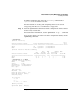
Step 2. Issue the vparstatus command to list the current boot status and
high-level configuration information for all vPars defined in the
currently active vPars database (vpdb) used by the local nPartition
# vparstatus
[Virtual Partition]
Boot
Virtual Partition Name State Attributes Kernel Path Opts
============================== ===== ========== ========================= =====
Shad Up Dyn,Auto /stand/vmunix
Mesh Down Dyn,Manl /stand/vmunix boot
[Virtual Partition Resource Summary]
CPU Num Memory (MB)
CPU Bound/ IO # Ranges/
Virtual Partition Name Min/Max Unbound devs Total MB Total MB