
Technical data





Virtual Partitions (vPars) Management on nPartitions
Deleting a vPar
HP System Partitions Guide: Administration for nPartitions, rev 5.1
480
============================== ================ ==== ====================
Shad 2/ 8 2 0 7 0/ 0 2048
Mesh 2/ 12 2 0 3 0/ 0 0
#
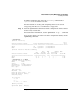
Step 3. Issue the vparremove -p
vpname
command to delete the specified vPar
(
vpname
) and then issue the vparstatus command to list the new
configuration status.
You can delete only vPars that are in a “Down” state, as reported by the
vparstatus command (see the example in the previous step).
See the vparremove (1M) manpage for details.
# vparremove -p Mesh
Remove virtual partition Mesh? [n] y
#
# vparstatus
[Virtual Partition]
Boot
Virtual Partition Name State Attributes Kernel Path Opts
============================== ===== ========== ========================= =====
Shad Up Dyn,Auto /stand/vmunix
[Virtual Partition Resource Summary]
CPU Num Memory (MB)
CPU Bound/ IO # Ranges/
Virtual Partition Name Min/Max Unbound devs Total MB Total MB
============================== ================ ==== ====================
Shad 2/ 8 2 0 7 0/ 0 2048
#