
Technical data






Virtual Partitions (vPars) Management on nPartitions
Modifying vPar Configuration Attributes
HP System Partitions Guide: Administration for nPartitions, rev 5.1
482
See the section Configuring vPar Resources and Attributes on page 447
for descriptions of the vPars configuration options.
Also see the vparmodify (1M) manpage for details.
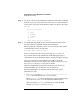
For example, the following commands set the vPar named “Mesh” to be
configured for autoboot; configure “Shad” to have 4 processors; and
configure “Mesh” to have 12 processors:
# vparmodify -p Mesh -B auto
# vparmodify -p Shad -m cpu::4
# vparmodify -p Mesh -m cpu::12
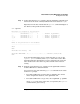
Step 4. Issue the vparstatus command to list the new status for the vPar you
modified in the previous step.
You can make further changes to the vPar by issuing additional
vparmodify commands.
# vparstatus
[Virtual Partition]
Boot
Virtual Partition Name State Attributes Kernel Path Opts
============================== ===== ========== ========================= =====
Shad Up Dyn,Manl /stand/vmunix
Mesh Up Dyn,Auto /stand/vmunix boot
[Virtual Partition Resource Summary]
CPU Num Memory (MB)
CPU Bound/ IO # Ranges/
Virtual Partition Name Min/Max Unbound devs Total MB Total MB
============================== ================ ==== ====================
Shad 2/ 8 2 2 7 0/ 0 2048
Mesh 2/ 12 2 10 3 0/ 0 2048
#