
Technical data



nPartition System Overviews
I/O Chassis in HP Superdome Compute Cabinets
HP System Partitions Guide: Administration for nPartitions, rev 5.1
50
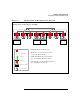
The Superdome I/O chassis and slot locations are shown in Figure 1-7.
Figure 1-7 HP Superdome I/O Chassis and PCI Card Slot Locations
As Figure 1-7 shows, I/O chassis in HP Superdome compute cabinets
reside both in the cabinet’s front (I/O bay 0) and its rear (I/O bay 1).
When you face each I/O bay, the left I/O chassis is chassis 1 and the right
chassis is I/O chassis 3. In I/O chassis in a Superdome compute cabinet,
PCI slot 11 is to the left and slot 0 is to the right.
In HP Superdome I/O expansion cabinets, the I/O chassis are identical
but are positioned sideways, with either slot 0 or slot 11 at the bottom.
Accessing Superdome Compute Cabinet I/O Chassis
and PCI Slots
Step 1. To access the I/O chassis in an HP Superdome compute cabinet, you
must open either the cabinet’s front door (to access I/O bay 0) or its rear
door (to access I/O bay 1). In each I/O bay—when facing the bay—I/O
chassis 1 is on the left and chassis 3 is on the right.