
Technical data





nPartition System Overviews
I/O Chassis in HP Superdome IOX Cabinets
HP System Partitions Guide: Administration for nPartitions, rev 5.1
51
See Figure 1-7 on page 50 for details.
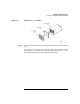
Step 2. To access the PCI card slots in an HP Superdome compute cabinet’s I/O
chassis, you must remove the cover from the top of the I/O chassis.
In each Superdome compute cabinet I/O chassis—when facing the
chassis—PCI slot 0 is on the right and PCI slot 11 is on the left.
I/O Chassis in HP Superdome IOX Cabinets
Up to two I/O expansion (IOX) cabinets can reside in an HP Superdome
complex.
I/O expansion cabinets are numbered cabinets 8 and 9.
The IOX cabinet uses the same I/O chassis as the Superdome compute
cabinet. Each IOX I/O chassis has 12 slots, numbered from 11 to 0. See
Table 1-1 on page 49 for details about the card slots.
Each I/O expansion cabinet has its own power supplies, fans, and
utilities (which are connected to the Superdome server’s service
processor bus).
The I/O chassis (and PCI card slots) within each I/O expansion cabinet
are made available to nPartitions through direct I/O chassis-to-cell
connections—exactly as internal Superdome server cabinet I/O chassis
are connected to cells.
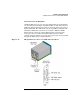
Three I/O bays can be housed in each IOX. These bays are numbered
from bottom to top: I/O bay 0, bay 1, and bay 2, as shown in Figure 1-8.