
Technical data





Virtual Partitions (vPars) Management on nPartitions
Adding or Removing nPartition Cells from a Virtual Partition
HP System Partitions Guide: Administration for nPartitions, rev 5.1
512
Use the parmodify command or Partition Manager to initiate the cell
addition or removal. For detailed information on adding or removing the
cell see the following list:
• You should adhere to HP’s nPartition requirements and guidelines
when adding or removing cells from an nPartition; refer to the
chapter Planning nPartition Configurations on page 109.
• For details on adding or removing a cell from an nPartition, refer to
the chapter Managing nPartitions on page 245.
After you have used the parmodify command or Partition Manager to
modify the local nPartition’s configuration, proceed with the next step.
Step 5. Determine if the local nPartition must be shut down to perform a
reboot for reconfig.
The cell addition and removal procedures referenced in the previous step
describe the situations where a reboot for reconfig of the local nPartition
is required.
You must perform a reboot for reconfig if you removed an active cell or
you specified the -B option to the parmodify command. You also should
perform a reboot for reconfig if you added a cell with a “y”
use-on-next-boot value.
You do not need to perform a reboot for reconfig if you removed an
inactive cell (and did not specify the -B option) or if you added a cell with
a “n” use-on-next-boot value (and did not specify the -B option).
Step 6. Only if required to complete the nPartition configuration change,
perform a reboot for reconfig of the local nPartition.
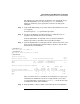
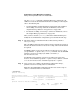
First issue the vparstatus command to list the state (such as “Up” or
“Down”) of all vPars in the local nPartition.
# vparstatus
[Virtual Partition]
Boot
Virtual Partition Name State Attributes Kernel Path Opts
============================== ===== ========== ========================= =====
Shad Up Dyn,Manl /stand/vmunix
Mesh Load Dyn,Manl /stand/vmunix boot
[Virtual Partition Resource Summary]
CPU Num Memory (MB)
CPU Bound/ IO # Ranges/