
Technical data




Virtual Partitions (vPars) Management on nPartitions
Adding or Removing nPartition Cells from a Virtual Partition
HP System Partitions Guide: Administration for nPartitions, rev 5.1
513
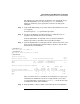
Virtual Partition Name Min/Max Unbound devs Total MB Total MB
============================== ================ ==== ====================
Shad 2/ 8 2 0 7 0/ 0 2048
Mesh 2/ 12 2 0 3 0/ 0 2048
#
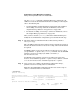
To perform the reboot for reconfig of the local nPartition:
• First issue the shutdown -R command in the current vPar.
• Then in all other vPars that are at an “Up” or “Load” or “Boot” state,
issue the shutdown -r command.
Any vPars in a “Load” or “Boot” state must be shut down after they
finish loading/booting HP-UX.
If the nPartition has only one vPar—or if all other vPars are in a
“Down” or “Shut” state—you do not need to shut down other vPars.
For details see vPar Management: Performing a Reboot for Reconfig or
Shutdown to Ready for Reconfig from a vPar on page 508.
After you issue the above shutdown commands, HP-UX on the vPars is
shut down and the vPars monitor is automatically rebooted.
Because a reboot for reconfig is a reset of the nPartition hardware, any
vPars that are configured for autoboot do not do so at this time. Instead,
the nPartition boot process takes place—including the configured
nPartition autoboot behavior (defined by the nPartition’s Path Flag
settings).
As the reboot for reconfig occurs, all cells assigned to the nPartition will
reset, any cell assignment changes for the nPartition will occur, and the
cells will proceed to perform their self tests.
After the nPartition’s cells complete self tests the partition rendezvous
can occur and then the nPartition’s BCH interface is initiated. If the
nPartition is configured to autoboot, then that will occur; otherwise, the
BCH interface is made available through the nPartition console
interface.
To load/boot all vPars, you can use the normal vPar boot methods. See
the section Booting HP-UX on vPars on page 485 for details.