
Technical data





nPartition System Overviews
I/O Chassis in HP Superdome IOX Cabinets
HP System Partitions Guide: Administration for nPartitions, rev 5.1
52
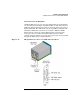
Figure 1-8 I/O Expansion Cabinet (IOX) for HP Superdome
Each I/O bay in an IOX houses two I/O chassis: the left chassis is I/O
chassis 1, right is chassis 3. Thus, an IOX can have up to six I/O chassis
that can connect to the cells in an attached Superdome compute cabinet.
Accessing Superdome IOX I/O Chassis and PCI Card Slots
This procedure describes how to access the I/O chassis and PCI card slots
in an HP Superdome I/O expansion cabinet (IOX).
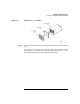
Step 1. To access the I/O chassis in an IOX bay, you must remove the front bezel
from the bay, and also remove the EMI cover, as shown in Figure 1-9.
The two I/O chassis in each IOX bay are accessible when the I/O bay
slides out from the IOX cabinet.