
Technical data





nPartition System Overviews
Internal Disk Devices for HP rp7410 and rp8400 Servers
HP System Partitions Guide: Administration for nPartitions, rev 5.1
55
On both HP rp7410 and rp8400 servers, slots 1–7 are dual-rope slots,
which have two connections between the slot’s local bus adapter (LBA)
and the I/O chassis system bus adapter (SBA). The core I/O connections
(slot 0) and slot 8 are single-rope slots, which have a single connection
between the slot LBA and the I/O chassis SBA. The dual-rope slots can
have greater sustained bandwidth than single-rope slots.
Internal Disk Devices for HP rp7410
and rp8400 Servers
This section covers hardware paths and locations for the internal disk
devices in rp7410 and rp8400 servers:
• Disk Devices in HP rp7410 Cabinets on page 55
• Disk Devices in HP rp8400 Cabinets on page 56
Disk Devices in HP rp7410 Cabinets
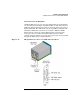
The hardware paths for internal drives in an HP rp7410 cabinet are
shown in Figure 1-10.
Figure 1-10 HP rp7410 Internal Storage Hardware Paths
As Figure 1-10 shows, in an HP rp7410 cabinet the top internal disk
drives connect to cell 1 through the core I/O for cell 1 (for 1/0/0/3/0.6) and
the LAN/SCSI card in slot 1_8 (I/O chassis 1 slot 8, for 1/0/1/0/0/1/1.6).
Both of the bottom disk drives (0/0/0/3/0.6 and 0/0/0/3/0.5) connect to cell
0 through the core I/O for cell 0.
A CD/DVD-ROM drive or DAT drive connects to cell 1 through the core
I/O card for cell 1, thus it can be accessed through cell 1’s nPartition only.
1/0/0/3/0.6
0/0/0/3/0.6 0/0/0/3/0.5
1/0/1/0/0/1/1.6
1/0/0/3/0.x
where x is:
2 for CD/DVD-ROM
3 for DAT
HP rp7410 Front View: Cabinet-Internal I/O Devices
Cell 1 CD/DVD or DAT
Cell 1 Disk Cell 1 Disk
Cell 0 DiskCell 0 Disk