
Technical data







nPartition System Overviews
rad Command Output in nPartitions
HP System Partitions Guide: Administration for nPartitions, rev 5.1
81
rad Command Output in nPartitions
This section covers the rad command’s output on nPartitions. For
complete details, see the rad (1M) manpage.
NOTE When adding or replacing I/O cards, use the SAM (/usr/sbin/sam)
procedures when possible rather than equivalent rad command
procedures.
See also the sam (1M) and rad (1M) manpages.
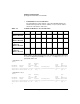
On HP nPartition servers, the rad command reports PCI card slot details
as shown in the following example output. The rad command reports
each available PCI slot (
cabinet-bay-chassis-slot
), its corresponding
HP-UX hardware path (
cell/sba/lba/device
), and more details.
The rad command only lists slots in PCI chassis that are assigned to the
local nPartition and are active.
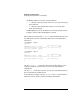
# rad -q
Driver(s)
Slot Path Bus Speed Power Occupied Suspended Capable
0-0-1-0 0/0/0 0 33 On Yes No No
0-0-1-1 0/0/1/0 8 33 On Yes No Yes
0-0-1-2 0/0/2/0 16 33 On Yes No Yes
0-0-1-3 0/0/3/0 24 33 On Yes No Yes
0-0-1-4 0/0/4/0 32 33 On Yes No Yes
0-0-1-5 0/0/6/0 48 66 On Yes N/A N/A
0-0-1-6 0/0/14/0 112 33 On No N/A N/A
0-0-1-7 0/0/12/0 96 33 On No N/A N/A
0-0-1-8 0/0/11/0 88 33 On Yes No Yes
0-0-1-9 0/0/10/0 80 33 On No N/A N/A
0-0-1-10 0/0/9/0 72 33 On No N/A N/A
0-0-1-11 0/0/8/0 64 33 On Yes No Yes
0-1-3-0 2/0/0 0 33 On Yes No No
0-1-3-1 2/0/1/0 8 33 On Yes No Yes
0-1-3-2 2/0/2/0 16 33 On Yes No Yes
0-1-3-3 2/0/3/0 24 33 On Yes No Yes
0-1-3-4 2/0/4/0 32 33 On No N/A N/A
0-1-3-5 2/0/6/0 48 33 On No N/A N/A
0-1-3-6 2/0/14/0 112 66 On Yes N/A N/A
0-1-3-7 2/0/12/0 96 33 On No N/A N/A
0-1-3-8 2/0/11/0 88 33 On Yes No Yes
0-1-3-9 2/0/10/0 80 33 On No N/A N/A
0-1-3-10 2/0/9/0 72 33 On No N/A N/A
0-1-3-11 2/0/8/0 64 33 On Yes No Yes
#
Cabinet 0, Bay 0, Chassis 1, Slot 3
(rad slot notation: 0-0-1-3)
Cell 2, SBA 0, LBA 6, Device 0
(HP-UX hardware path: 2/0/6/0)