
- Hewlett-Packard Visualization Center Installation And User's Guide


installation and user information
installation process
Chapter 2 41
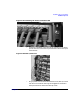
Figure 2-13Connecting HP ProCurve Hub to LAN
• Connect one standard CAT5 cable (RJ45 connector) to an empty
port on the hub to connect the hp visualization center sv6 to your
site’s network.
Figure 2-14Power I/O Devices
• Plug in power from the Power Distribution Units (PDUs) on each
rack. Be sure to heed all warnings and suggestions outlined in
the hp visualization center sv6 Site Prep Guide.