
HP Pavilion x360 Convertible PC (model numbers 15-bk100 through 15-bk199 and 15-bk000 through 15-bk099) - Maintenance and Service Guide
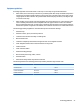
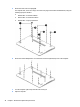
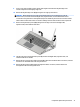

9. Insert a case utility tool (1) or similar plastic, at-edged tool between the keyboard/top cover
and the computer near the display hinge area.
10. Release the keyboard/top cover (2) by lifting the rear edge up and forward.
CAUTION: Before lifting the front edge of the keyboard/top cover and detaching it from the
base enclosure, be aware that the backlight cable, keyboard cable, and TouchPad cable are still
connected to the system board. The keyboard/top cover should only be moved as far as these cables
allow. Failure to follow this caution can result in damage to these cables and their main components.
11. Remove the keyboard/top cover (3) by lifting the front edge as far as the backlight cable,
keyboard cable, and TouchPad cable allow.
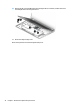
12. Lift the front edge of the keyboard/top cover (1) until the backlight cable, keyboard cable, and
TouchPad cable are accessible.
13. Release the zero insertion force (ZIF) connector (2) to which the TouchPad cable is connected, and then
disconnect the TouchPad cable from the system board.
14. Release the ZIF connector (3) to which the keyboard cable is connected, and then disconnect
the keyboard cable from the system board.
Component replacement procedures 31