
HP Pavilion x360 Convertible PC (model numbers 15-bk100 through 15-bk199 and 15-bk000 through 15-bk099) - Maintenance and Service Guide

Memory module
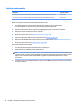
Description Spare part number
8-GB (PC3L, 12800, 1600) 693374-005
4-GB (PC3L, 12800, 1600) 691740-005
2-GB (PC3L, 12800, 1600) 691739-005
Before removing a memory module, follow these steps:
1. Turn o the computer. If you are unsure whether the computer is o or in Hibernation,
turn the computer on, and then shut it down through the operating system.
2. Disconnect the power from the computer by unplugging the power cord from the computer.
3. Disconnect all external devices from the computer.
4. Remove the base enclosure (see Keyboard/top cover on page 28).
5. Disconnect the battery cable from the system board (see Battery on page 33).
6. Disconnect the WLAN module antenna cables from the WLAN module (see WLAN module on page 37).
7. Remove the system board (see System board on page 40).
Remove the memory module:
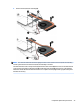
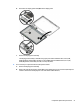
1. Turn the system board upside down with the front toward you.
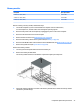
2. Remove the memory module shield.
The memory module shield is not available as a replacement spare part component.
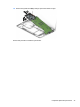
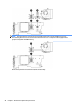
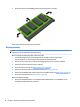
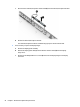
3. Spread the retaining tabs (1) on each side of the memory module slot to release the memory module.
(The memory module tilts up.)
Component replacement procedures 47