
HP Pavilion x360 Convertible PC (model numbers 15-bk100 through 15-bk199 and 15-bk000 through 15-bk099) - Maintenance and Service Guide
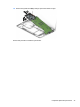
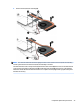
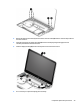
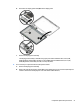

2. Release the display panel cable (1) and the wireless antenna cables (2) from the retention clips built into
the base enclosure.
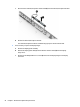
3. Swing the top edge of the display assembly (3) back until the display hinges disengage from the
retention pins built into the base enclosure.
4. Slide the display assembly (4) forward and separate it from the base enclosure.
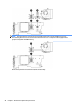
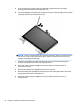
5. If it is necessary to replace the display panel assembly:
Component replacement procedures 49