
HP Pavilion x360 Convertible PC (model numbers 15-bk100 through 15-bk199 and 15-bk000 through 15-bk099) - Maintenance and Service Guide
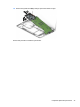
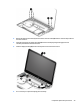
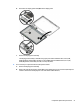

h. Disconnect the display panel cable (6) from the display panel.
i. Remove the display panel assembly.
The display panel assembly is available using spare part numbers 862643-001 (15.6-in, FHD,
WLED, AntiGlare (1920×1080), slim-at (3.2-mm), UWVA, eDP) and 862644-001 (15.6-in, HD,
WLED, BrightView (1366×768), slim-at (3.2-mm), SVA, eDP).
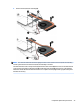
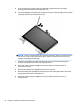
6. If it is necessary to replace the webcam/microphone module:
a. Remove the display panel assembly.
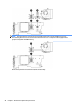
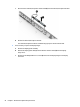
b. Detach the webcam/microphone module (1) from the display back cover. The webcam/microphone
module is attached to the display back cover with double-sided adhesive.)
Component replacement procedures 51