
User Manual



2
Keys and Functions
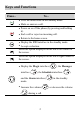
Press… To…
z
View the dialed calls in the standby mode.
z
Make or answer a call.
z
Power on or off the phone (by pressing and holding
it).
z
End a call or reject an incoming call.
z
Return to the home screen.
z
Display the UNI interface in the standby mode.
z
Accept a selection.
Select the option displayed on the lower left corner of
the screen.
Select the option displayed on the lower right corner of
the screen.
z
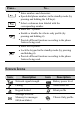
Display the Magic interface ( ), the Messages
interface (
), the Scheduler interface ( ),
and the Alarm interface ( ) in the standby
mode.
z
Increase the volume ( ) or decrease the volume
(
) during a call.