
User Manual



6
Using the Function Menu
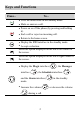
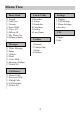
1. In the standby mode, press to display the Menu interface.
2. Press to scroll to a menu item.
3. Press (Select) to display the menu.
4. Display the submenu in either of the ways:
¾ Press to scroll to a submenu item and press
(Select) to display the submenu.
¾ Press the number key corresponding to the number of a
submenu to display it.
5. Press (Back) to return to the previous menu or quit the
function menu.
Press
to return to the home screen.
Making a Call
1. In the standby mode, enter a phone number.
2. Press to dial the number.
3. Press to end the call.
Note
z When the phone is locked, enter the lock code to unlock
the phone first; otherwise, you can make emergency calls
or answer calls only.
z In the standby mode, press to view the dialed calls.
Select a record and press
to dial.
z Select a contact from the phonebook and press to
dial.