
Operating Manual


12
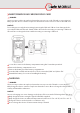
Your device package contains a power supply, various country-specic power adapters and
an Type C USB Cable.
Connect the power adapter suitable for your country to the power supply.
Connect the Type C USB Cable to the power supply.
Connect the Type C USB Cable to the USB interface of the device.
SWITCHING ON/OFF
Press and hold the on/o key for about 3 seconds.
Enter the device or SIM PIN when the input dialog for the device or SIM PIN appears after
switching on.
Select the <Switch o> menu item if the power o menu appears when switching o.
USING THE DEVICE
When turning on the device for the rst time, follow the instructions on the screen.
Further information on operating the device can be found at
www.isafe-mobile.com/en/support/service under the menu item “FAQ”.
Detailed information on operating the Android operating system can be found at:
https://support.google.com/android.
CONNECTING APPROVED ACCESSORIES
Only connect accessories approved by i.safe MOBILE to the device. Accessories approved by
i.safe MOBILE can be found at www.isafe-mobile.com/en/products.
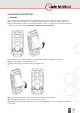
Approved accessories can be connected to the USB interface.
USB INTERFACE
DANGER
Improper use can result in death or severe injuries! Only use USB interface outside of explosi-
on hazardous areas. Under no circumstances should you open the cover of the USB interface
in explosion hazardous areas.
The USB interface is used for charging and data transfer.
Connect approved accessories or other devices to the USB interface only by using the
Type C USB Cable.