
Laptop User Manual
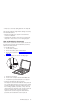
Table Of Contents
- Contents
- ThinkPad s30, s31 Hardware Maintenance Manual
- Read This First
- Product Overview
- Related service information
- Checkout Guide
- Symptom-to-FRU Index
- Numeric Error Codes
- Error Messages
- No Beep Symptoms
- LCD-Related Symptoms
- Keyboard-Related Symptoms
- Indicator-Related Symptoms
- Power-Related Symptoms
- PC Card (PCMCIA)-Related Symptoms
- CompactFlash Card-Related Symptoms
- Speaker-Related Symptoms
- Power Management-Related Symptoms
- Peripheral-Device-Related Symptom
- Intermittent Problems
- Undetermined Problems
- CE Utility Program Diskette
- Running the Diagnostics
- FRU Removals and Replacements
- FRU Service Procedures
- 1010 Battery ASM
- 1020 Keyboard ASM
- 1030 Hard Disk Drive ASM
- 1035 Hard Disk Drive FPC ASM
- 1040 Suspend Board ASM
- 1045 Suspend Board Cable ASM
- 1050 Modem Card ASM
- 1055 Modem Cable ASM
- 1060 Wireless Card ASM (s30 only)
- 1065 IEEE 1394/LAN Card ASM
- 1070 IEEE 1394/LAN Card Cable ASM
- 1075 DIMM Card ASM
- 1080 Upper Cover ASM
- 1085 Speaker ASM
- 1090 Palm Rest ASM
- 1100 Fan ASM
- 1130 PCMCIA Slots
- 1140 System Board
- 1145 Power Board ASM
- 1150 LCD Bezel ASM
- 1155 LCD Rear Cover ASM
- 1160 LCD Inverter ASM
- 1170 LCD FPC ASM
- 1180 LCD Panel ASM
- 1185 Hinge ASM
- 1190 Hinge ASM (Wireless—s30 only)
- 1195 Base ASM
- Computer Parts Listing
- LCD Unit Parts Listing
- Service Tools
- Notices
- Trademarks
v Sticky keys caused by spilling liquid onto the keyboard
The following symptoms might indicate damage caused by
non-warranted activities:
v Missing parts might be a symptom of unauthorized
service or modification.
v Hard disk drive spindles can become noisy from being
subjected to excessive force or from being dropped.
How to Disable the Password
There are three passwords used at a typical customer site:
the Supervisor Password, the hard disk drive password,
and the Power On password.
v Power On password:
1. Power off the computer.
2. Remove the battery pack and AC Adapter.
3. Remove the keyboard, see “1020 Keyboard ASM” on
page 31.
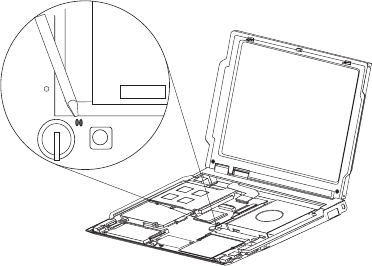
4. Short the jumper JP1. See the following figure:
JP1
5. Replace the keyboard.
6. Power on the computer and wait until POST ends.
7. Verify that the password prompt does not appear.
v Supervisor and hard disk drive passwords:
The Supervisor Password and hard disk drive password
are security features that are used to protect the system
and the hard disk drive data from unauthorized access.
No overriding capability is provided, so they cannot be
replaced if they are forgotten. If the customer forgets the
Supervisor Password, the system board must be
replaced. If the customer forgets the hard disk drive
password, the hard disk drive must be replaced.
ThinkPad s30, s31
3