
Laptop User Manual
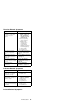
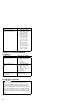
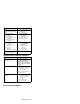
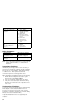
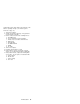
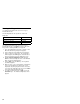
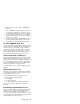
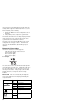
Table Of Contents
- Read This First
- Product Overview
- Checkout Guide
- Optional Device Checkout
- Power Management Features
- Symptom-to-FRU Index
- Running the Diagnostics
- Related Service Procedures
- FRU Removals and Replacements
- Important Notice
- FRU Service Procedures
- Removal Reference
- 1010 DIMM Card and Backup Battery
- 1020 Battery Pack
- 1030 Hard Disk Drive
- 1040 Keyboard Unit
- 1050 Keyboard and Speakers
- 1060 Diskette Drive Assembly or CD-ROM Assembly
- 1070 Diskette Drive and CD-ROM Drive
- 1080 LCD Unit
- 1090 Fan Assembly, CPU Card, and Thermal Rubber
- 1100 Upper Shield Case
- 1110 Box Speaker and Microphone
- 1120 DC/DC Card
- 1130 System Board and PC Card Slot
- 1140 Battery Pack Latch
- 2010 LCD Front Cover
- 2020 LCD Inverter Card
- 2030 LCD Panel
- 2040 LCD Misc. Parts
- 2050 LCD Cable
- 3010 ThinkPad Port Replicator with Advanced EtherJet Feature
- Locations
- Parts List
- Notices

Symptom / Error FRU / Action in Sequence
No beep, power-on indicator
on, and a blank LCD during
POST.
1. Reseat the CPU card.
2. DC/DC card
3. System board
1. LCD backlight not
working.
2. LCD too dark.
3. LCD brightness cannot
be adjusted.
4. LCD contrast cannot
be adjusted.
1. Reseat the LCD
connectors.
2. LCD inverter card
3. LCD assembly
4. System board
1. The LCD screen is
unreadable.
2. Some pels missing in
characters.
3. The screen is
abnormal.
4. Wrong color displayed.
1. See important note
for “LCD-Related
Symptoms.”
2. Reseat all LCD
connectors.
3. LCD assembly
4. System board
LCD has extra horizontal or
vertical lines displayed.
LCD assembly
Peripheral-Device-Related Symptoms
Symptom / Error FRU / Action in Sequence
The external monitor does
not work correctly.
Connect the external
monitor to another PC. If
the monitor works fine,
replace the system board.
If not, replace the external
monitor.
Printer problems. 1. Run printer self-test.
2. Parallel port wrap test.
3. System board
4. Printer cable
(See the printer manual for
the above tests.)
Serial or parallel port device
problems.
1. Run serial or parallel
port wrap test. (See
the device manual for
the test.)
2. Device
3. System board
4. Device cable
Power-Related Symptoms
ThinkPad 380Z 31