
Laptop User Manual
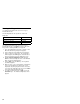
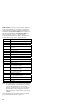
Table Of Contents
- Read This First
- Product Overview
- Checkout Guide
- Optional Device Checkout
- Power Management Features
- Symptom-to-FRU Index
- Running the Diagnostics
- Related Service Procedures
- FRU Removals and Replacements
- Important Notice
- FRU Service Procedures
- Removal Reference
- 1010 DIMM Card and Backup Battery
- 1020 Battery Pack
- 1030 Hard Disk Drive
- 1040 Keyboard Unit
- 1050 Keyboard and Speakers
- 1060 Diskette Drive Assembly or CD-ROM Assembly
- 1070 Diskette Drive and CD-ROM Drive
- 1080 LCD Unit
- 1090 Fan Assembly, CPU Card, and Thermal Rubber
- 1100 Upper Shield Case
- 1110 Box Speaker and Microphone
- 1120 DC/DC Card
- 1130 System Board and PC Card Slot
- 1140 Battery Pack Latch
- 2010 LCD Front Cover
- 2020 LCD Inverter Card
- 2030 LCD Panel
- 2040 LCD Misc. Parts
- 2050 LCD Cable
- 3010 ThinkPad Port Replicator with Advanced EtherJet Feature
- Locations
- Parts List
- Notices

Running the Diagnostics
Use either the TrackPoint or the cursor move keys to
interact with the tests.
The following table lists the special tools used in the
diagnostics:
Use either the TrackPoint or the cursor move keys to
interact with the tests. The Enter key works in the same
way as when selecting the OK icon to reply OK.
1. Press and hold F1; then turn on the computer. Hold
F1 down until the Easy-Setup menu appears.
2. Click on Test. The basic diagnostic menu appears.
3. Click on a device to run the test. The test progress
window appears; then OK appears under the tested
device icon when the test ends without any errors.
4. Start the Advanced Diagnostic test by pressing
Ctrl+A on the basic diagnostic menu. The ThinkPad
FRU connections window appears.
5. Click on Exit or press the Esc key. The keyboard
test window appears.
6. When you press a key, a mark appears or disappears
on the corresponding key position on the screen.
Repeat this step for any key that needs to be tested.
You can run the keyboard test if you press the Ctrl+K
keys at the advanced diagnostic menu.
7. To exit the keyboard test, click on Exit or press the
Ctrl+Break keys. The Advanced Diagnostics menu
appears.
Tool Name Part Number
PC test card 35G4703
Tri-Connector wrap plug 72X8546
USB parallel test cable 05K2580
34