
Laptop User Manual
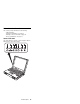
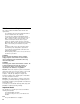
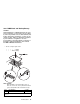
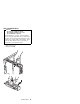
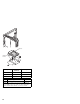
Table Of Contents
- Read This First
- Product Overview
- Checkout Guide
- Optional Device Checkout
- Power Management Features
- Symptom-to-FRU Index
- Running the Diagnostics
- Related Service Procedures
- FRU Removals and Replacements
- Important Notice
- FRU Service Procedures
- Removal Reference
- 1010 DIMM Card and Backup Battery
- 1020 Battery Pack
- 1030 Hard Disk Drive
- 1040 Keyboard Unit
- 1050 Keyboard and Speakers
- 1060 Diskette Drive Assembly or CD-ROM Assembly
- 1070 Diskette Drive and CD-ROM Drive
- 1080 LCD Unit
- 1090 Fan Assembly, CPU Card, and Thermal Rubber
- 1100 Upper Shield Case
- 1110 Box Speaker and Microphone
- 1120 DC/DC Card
- 1130 System Board and PC Card Slot
- 1140 Battery Pack Latch
- 2010 LCD Front Cover
- 2020 LCD Inverter Card
- 2030 LCD Panel
- 2040 LCD Misc. Parts
- 2050 LCD Cable
- 3010 ThinkPad Port Replicator with Advanced EtherJet Feature
- Locations
- Parts List
- Notices

1030 Hard Disk Drive
Warning
Do not drop or apply any shock.
Do not apply pressure to the cover.
Do not touch the connector.
The hard disk drive is sensitive. Incorrect handling
can cause damage and permanent loss of data on the
hard disk. Before removing the hard disk drive, make
a backup copy of all the data on the hard disk. Never
remove the drive while the system is operating, in
suspend mode, or in hibernation mode.
Open the LCD cover.
Battery Pack (1020)
1
3
2
ThinkPad 380Z 47