
Laptop User Manual


6
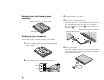
Connect the AC Adapter to the computer's power jack (at
the rear of the computer) in the order shown.
1
2
3
7
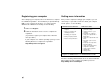
Open the liquid crystal display (LCD).
Press the LCD latches .1/ and open the LCD .2/. Then
position the LCD so that it is convenient for viewing.
8
Power on the computer.
a) Push and release the power switch .1/. The power
switch automatically snaps back to its original position.
b) Adjust the brightness of the display with the brightness
control .2/.
12.1-inch model
2
Brightness
1
13.3-inch model
2
Brightness
1
Copyright IBM Corporation 1999