
Computer User's Reference Manual


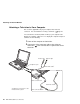


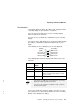

Attaching an External Monitor
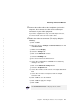
Displaying output on the LCD or on both the LCD and the
external monitor (LCD Only or Both LCD and CRT Display)
Displaying output only on the external monitor (CRT Display
Only)
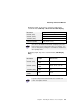
Resolution Supported Color Depth
640x480 (VGA) 16, 256, 64K, and 16M
800x600 (SVGA) 256, 64K, and 16M
1024x768 (XGA) 256, 64K, and 16M
1280x1024 (SXGA) 256 (Virtual Screen)
You can use the
virtual screen
function to display a part of the
high-resolution screen image produced by your computer. You
can see other parts by moving the screen with the TrackPoint or
other pointing device.
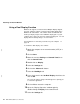
Resolution
Supported Color
Depth
Refresh Rate
640x480 (VGA)
256, 64K, and
16M
60 Hz, 75 Hz, or 85 Hz
800x600 (SVGA)
256, 64K, and
16M
60 Hz, 75 Hz, or 85 Hz
1024x768 (XGA)
256, 64K, and
16M
60 Hz, 70 Hz, 75 Hz, or 85
Hz
1280x1024
(SXGA)
256 60 Hz
If you are using an old external monitor, the resolution and
refresh rate might be limited.
Chapter 2. Extending the Features of Your Computer 69